Scan and translate Japanese to English without flattening the page into plain text
Scan a Japanese page with your phone and the hard part isn't the kanji — it's the red hanko sitting on top of the words, and the ruled table the translation has to stay inside.
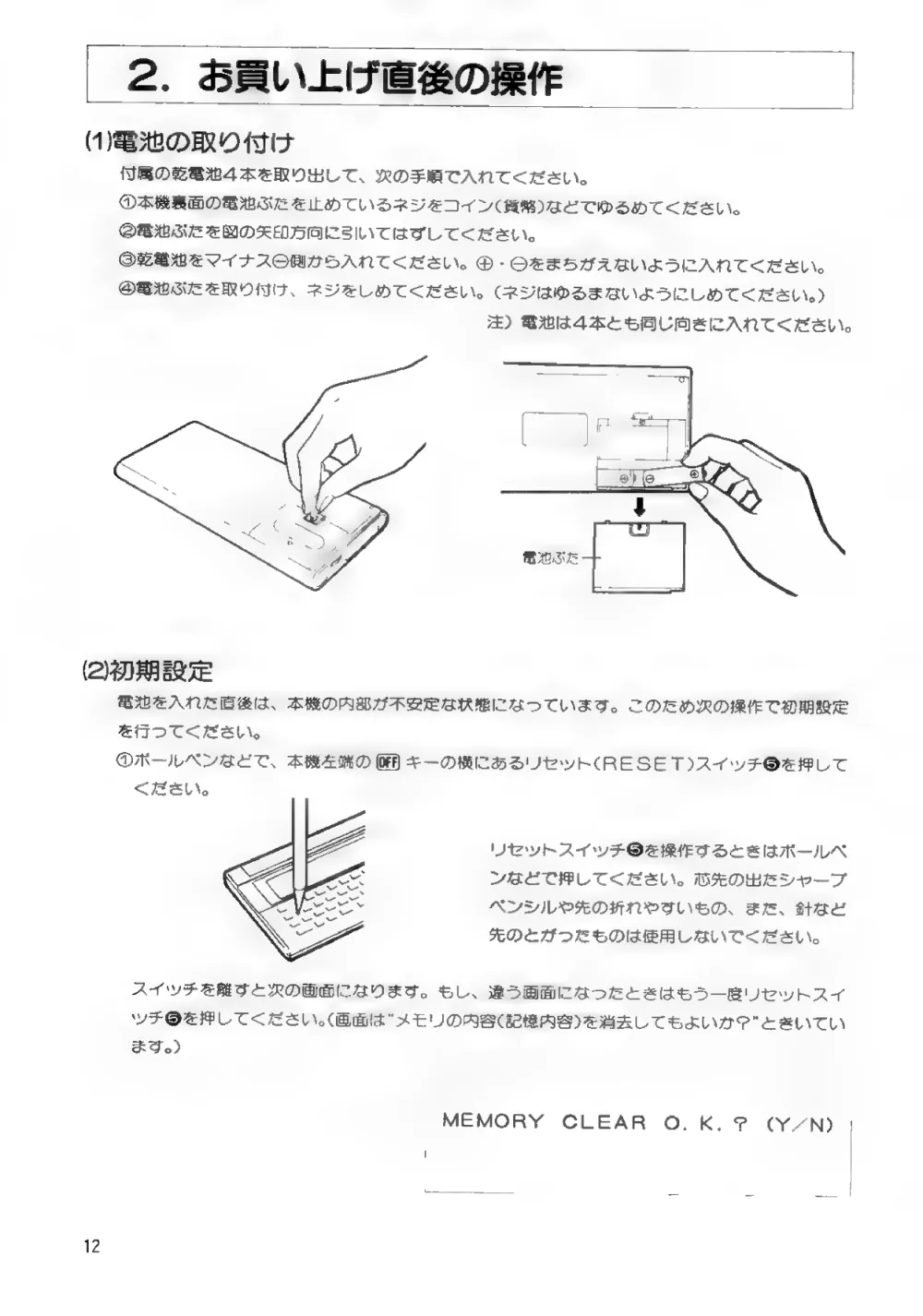
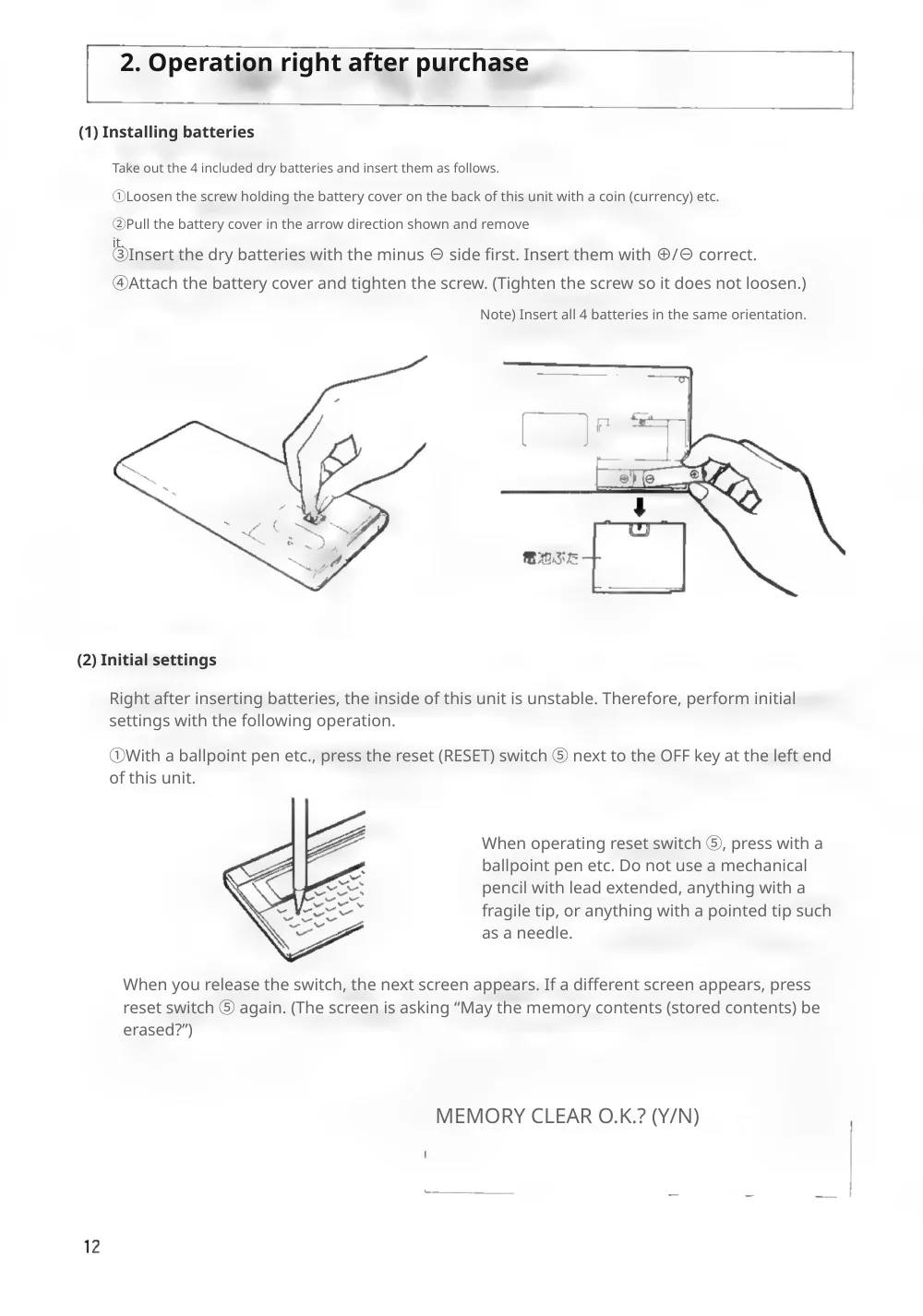
Reglyph reads the page as it was printed and rebuilds the English in the same place, without moving the seal, the ruled table, or the figure it was pointing at. The hanko is part of the scanned image, so it is never something the translation has to work around.
A real scanned Japanese page, before and after
This is page 12 of the 1988 instruction manual (取扱説明書) for the Sharp PC-G801 pocket computer, scanned from a paper copy. Nothing here is a mock-up — drag the handle and compare it line by line.
A manual page is instructions wrapped around pictures: four circled steps that refer to a drawing of the battery cover, a reset switch marked ❺ in the text and pressed with a ballpoint pen in the illustration, and a screen prompt the reader is meant to recognise when it appears. Japanese says each step in one compact line; English needs noticeably more width for the same step, and every line still has to stay above the drawing it describes.
- the boxed section heading, now “2. Operation right after purchase”, and both sub-headings
- the circled step numbers ①–④ and the ⑤ marker for the reset switch
- all three line drawings — the coin on the screw, the battery cover coming off, the pen on the reset switch — untouched and in place
- the MEMORY CLEAR O.K.? (Y/N) screen prompt with the display outline around it, and the page number 12
Step ② ran out of room: “remove it.” wraps, and the stray “it.” sits on top of step ③ directly below. Steps ① and ② are also set smaller than ③ and ④. The label 電池ぶた (battery cover) inside the right-hand drawing stays in Japanese — it is part of the illustration, so it is left alone.
Scanning Japanese documents — frequently asked
Already have a digital Japanese PDF rather than a scan? Japanese → English document translation
Can I take a photo of a Japanese document and translate it to English?
Yes, once it's a PDF. Scan the page with your phone's document scanner — the Files app on iPhone and the Google Drive app on Android both save straight to PDF and correct the perspective — or save an existing photo as a PDF. Either way you get a translated PDF back rather than text on a camera overlay, which is the difference from a live camera translator: the result is a document you can send on.
Does it handle vertical (縦書き) Japanese?
Only partly. Vertical columns can be read, but English can only be set horizontally, so a vertical page comes back as horizontal text and will not match the original layout. Horizontal documents — forms, certificates, manuals — are where the layout is kept.
Will the hanko seal and the ruled table survive?
Yes. A hanko is part of the page image, not part of the text, so it is left exactly where it was stamped — including where it overlaps printed characters. The same is true of ruled table lines and figure artwork; only the printed Japanese is removed and replaced.
Choose your plan
Simple, scan-friendly pricing. Pages are pages — no multiplier for scanned files.
Pay-as-you-go
Translate a few pages. No commitment.
$0.30 a page, from 10 pages — you pay for exactly 10 pages.
- Pages never expire
- Up to 100 MB per file
Lite
Most popularFor individuals with scans to translate every month.
Pro
For high-volume users with scans to translate every week.
- $0.06 / page
- 500 pages every month
- Unused pages roll over (up to 1,500)
- Up to 100 MB per file
Guides on translating scanned documents
The Best PDF Translation Services in 2026 (We Tried Them All)
Eight PDF translators run on the same scans and papers, scored on one table, with every tool's result shown side by side.
Read guideReglyph vs ChatGPT, Side by Side: Good on Simple Backgrounds. What About Photos and Papers?
Reglyph is our product, so we can't claim to be neutral. Both tools got the same files, and every result is shown as it came out.
Read guideReglyph vs Gemini, Side by Side: It Translates the Words, Not the Page
Reglyph is our product, so we can't claim to be neutral. Both tools got the same files, and every result is shown as it came out.
Read guide